AutoCount API Integration in Malaysia: Connect Your Systems to AutoCount
AutoCount connects to other systems through the AutoCount Accounting API (.NET, needs the API Module licence), a plug-in, 3rd Party XML or Excel import, or the Cloud Accounting Integration API. The right method depends on your edition, the source system and volume. We scope it on a free 15-minute call.
Proof status: design stage. We have used the AutoCount Cloud Accounting API on our own book (August to September 2026), but AutoCloud.my has not yet completed a client connector, so this page sets out our design standard, not past projects.
Which AutoCount integration methods are there?
AutoCount’s wiki lists these routes for its desktop edition: the AutoCount Accounting API, used through a standalone application, a web service or a plug-in, plus 3rd Party XML import and Excel import. AutoCount Cloud Accounting has its own Integration API that authenticates with a Key-ID and an API-Key. Each route suits a different volume and level of automation.
AutoCount Accounting (desktop): API, plug-ins and imports
The desktop routes are listed on the AutoCount wiki: Integration Methods (edited 2 Apr 2025). The API routes need the API Module licence and a .NET program; the import routes need a person to run each batch. The table compares all of them from an integrator’s point of view.
| Method | Edition | What it needs | Suits | Watch out for |
|---|---|---|---|---|
| AutoCount Accounting API via a standalone application | AutoCount Accounting (desktop) | API Module licence; a .NET program on a machine that can reach the AutoCount database | Scheduled syncs from a POS, marketplace or ordering system | The program should run where the AutoCount server is reachable |
| AutoCount Accounting API via a web service | AutoCount Accounting (desktop) | API Module licence; a small web service in front of AutoCount | Systems that push transactions in real time over HTTPS | The service must be secured and kept online |
| Plug-in | AutoCount Accounting (desktop) | API Module licence; a plug-in installed in AutoCount | New screens or buttons inside AutoCount itself | Plug-ins should be retested after AutoCount upgrades |
| 3rd Party XML import | AutoCount Accounting (desktop) | The Import 3rd Party XML module; a file in AutoCount’s XML format | Batch posting where a person triggers the import | Not real time; a person runs each batch |
| Excel import | AutoCount Accounting (desktop) | AutoCount Excel Import; a spreadsheet in the expected layout | Occasional bulk loads such as opening balances | Manual and easy to run twice by mistake |
| Cloud Accounting Integration API | AutoCount Cloud Accounting | An API key created under Settings, API Keys (Key-ID and API-Key headers) | Cloud users connecting web systems directly | Keys carry permissions; store them as secrets |
AutoCount Cloud Accounting: the Integration API
The cloud route is described in the AutoCount Cloud Accounting Integration API: Getting Started. Every call carries two headers created under Settings, API Keys. This is the shape of a read request as we call it on our own book; the IDs are placeholders, and real keys belong in a secret store, never in code or chat.
GET https://accounting-api.autocountcloud.com/<account-book-id>/department/listing
Key-ID: <your-key-id>
API-Key: <your-api-key>
Limits: when you do not need a custom AutoCount integration
A custom AutoCount integration is not worth building in every case. Low volume, a ready-made connector, invoices that already start in AutoCount or unready master data are all reasons to stop or start somewhere cheaper.
- Your volume is low. If a person keys a few dozen documents a month without errors, a connector may cost more than it saves. Excel or XML import may be enough.
- A ready connector already exists. Ask your POS or platform vendor first. A supported, ready-made connector can cost less than custom work.
- You only need e-invoices submitted. AutoCount’s own e-Invoice Platform (AIP) submits standard, consolidated and self-billed e-invoices from AutoCount to MyInvois (AutoCount e-Invoice Solution page). You need a bridge only when invoices start outside AutoCount.
- Your data is not ready. If customer and item codes differ between systems with no mapping, the first job is cleaning master data, not writing code.
- We do not sell hardware, payment-gateway accounts or AutoCount licences beyond our reseller role, and we do not give tax advice. Your accountant decides tax treatment.
What can you connect to AutoCount?
Systems that record a sale, purchase or payment can usually be connected to AutoCount if they can export their transactions: POS terminals, online marketplaces, web shops, payment gateways, ordering systems and spreadsheets. What matters is whether the source exposes each transaction, through an API, a webhook or a file, with a unique ID.
| Source system | What usually flows into AutoCount | Typical route | e-Invoice handling |
|---|---|---|---|
| POS (single or multi-outlet) | Daily sales summaries or individual cash sales, payments by tender type | API (scheduled) or XML import | Sales to buyers who do not ask for an e-invoice can go into the monthly consolidated e-invoice, subject to LHDN’s exclusions; see MyInvois e-invoice automation |
| Marketplaces (Shopee, Lazada, TikTok Shop) | Orders, platform fees, payouts | Marketplace API to AutoCount API | LHDN lists e-commerce transactions among self-billed cases; check with your accountant which documents apply |
| Web shop (WooCommerce, Shopify) | Orders, customers, refunds | Webhook to a web service | Buyers who ask for their own e-invoice must be identifiable, so capture their details at checkout |
| Payment gateway or DuitNow QR | Settlements, fees, refunds | Settlement report or callback to AutoCount API | Used to match payments; the sale document carries the e-invoice |
| WhatsApp or form-based ordering | Sales orders for known customers | Ordering system to AutoCount API, with human review for unmatched items | Issued from AutoCount once the invoice is posted |
| Custom ERP or in-house system | Invoices, credit notes, purchase documents | Web service or Cloud Integration API | If invoices start outside AutoCount, a bridge may submit them; see the MyInvois page |
The marketplace and gateway names above are examples of common sources, not a claim that we have built a connector for each. Every source is checked during scoping, because what a platform exposes changes over time.
Should you use the AutoCount API, a plug-in or an import?
Use an import when a person can run a daily or weekly batch and volume is modest. Use the API when transactions must arrive without anyone pressing a button, or arrive many times a day. Use a plug-in when staff need a new screen or button inside AutoCount. Cloud Accounting users use the Cloud Integration API.
When an import is enough
Month-end loads, migrations, or fewer than a few hundred documents a month where a person checks each batch.
When to use the API (standalone program or web service)
When the source system is online all day, when orders must post within minutes, or when you want automatic retries and a reconciliation report.
When a plug-in fits
When the work happens inside AutoCount, for example a button that pulls today’s marketplace orders into a review screen.
If you use AutoCount Cloud Accounting
Cloud users connect through the Integration API, called from a small service you host.
The desktop API routes require the API Module licence, which your AutoCount licence supplier can quote. We check your edition and modules before recommending a route.
How does a reliable AutoCount integration handle duplicates, retries and failures?
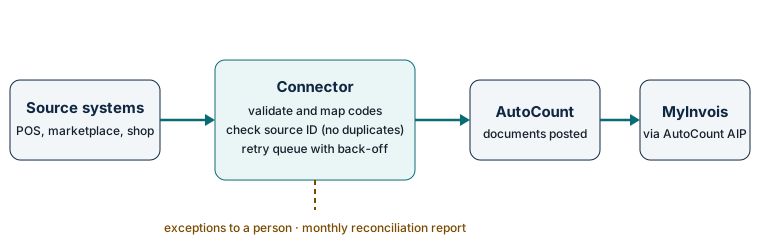
A reliable connector is designed to post each source transaction exactly once, even when it is sent twice. It stores the source transaction ID on the AutoCount document, checks for it before posting, queues failures for automatic retry, holds anything it cannot match for a person, and reconciles totals against the source on a schedule.
This is the design standard we scope for every connector. Each step exists because of a failure we expect in real systems.
- Capture with a source ID. Every incoming sale, order or payment keeps the ID it had in the source system. Without it, duplicates cannot be detected.
- Validate and map. Customer codes, item codes, tax codes and payment methods are mapped to AutoCount’s codes. Anything unknown is not guessed.
- Post idempotently. Before creating a document, the connector looks up the source ID in AutoCount. If it already exists, nothing new is posted.
- Retry with back-off. If AutoCount or MyInvois is unavailable or rate-limited, the transaction waits in a retry queue and is tried again with increasing delays. MyInvois documents intended limits of 100 Submit Documents requests and 12 logins per minute per client ID, and answers HTTP 429 with a Retry-After header when they are exceeded (MyInvois SDK: Integration Practices).
- Hold exceptions for a person. Transactions that cannot be posted on their own, such as a new item code, go to an exception list with the reason, so nobody has to search logs.
- Reconcile. A scheduled report (daily or monthly, agreed at scoping) compares counts and totals between the source system and AutoCount and lists every difference.
What have we learned from integrating AutoCount Cloud Accounting ourselves?
Using the AutoCount Cloud Accounting API on our own book taught us three things: keys carry broad permissions and must be stored as secrets, several text fields silently truncate long values, and the document model may lack a field your business assumes exists. Each lesson changes how a connector is designed and tested.
These are first-hand observations from Inpixel Marketing’s own book in August and September 2026. They describe what we saw, not AutoCount’s documentation, and AutoCount may change its product.
- API keys are powerful. The key we created carries full permissions. A connector should keep the key in a secret store, never in a spreadsheet or chat, and use the narrowest permissions AutoCount allows.
- Long text is cut without warning. In our book, some text fields stopped at 40 characters and saved the shortened value with no error. A connector should read each document back after posting and flag any value that did not survive intact.
- Check the fields you depend on. We looked for a project field to tag costs, but in the screens and endpoints we used, the closest available field was the department. If your reports depend on a dimension, confirm where it lives before mapping.
- Write, then verify. Defaults such as document numbering are applied by AutoCount. Reading the posted document back shows exactly what was stored.
What does an AutoCount integration project involve?
A project starts with a free 15-minute scoping call, then a written scope that lists source systems, monthly volumes, field mappings and how e-invoices are handled. The connector is tested on a test book or a copy before any live posting, then piloted with a reconciliation check. Timelines are quoted per project after scoping.
- Scoping call (free, 15 minutes). Which systems, how many transactions, which AutoCount edition and modules, and whether e-invoices start inside or outside AutoCount.
- Written scope. The data that moves, the mapping of codes, the error cases and who reviews exceptions.
- Build and test. On a test book or a copy, with duplicate, failure and long-text cases tested on purpose.
- Pilot. A limited period on live data with the reconciliation report checked by your accounts team.
- Go-live and handover. A short runbook: where the connector runs, how to read the exception list, and who to call.
We recommend running connectors on infrastructure you own, so you keep control of your data and the connector if you change providers.
How much does an AutoCount integration cost in Malaysia?
Published starting prices for connecting one system to AutoCount begin at about RM1,200 to RM1,500 on the Malaysian vendor pages we checked on 9 October 2026, with SST not stated. Multi-system projects are quoted after scoping by every vendor we checked. We do not publish build prices yet; our first step is a free 15-minute scoping call.
The two starting prices are Agile X’s AutoCount Web API middleware at RM1,200 (Agile X AutoCount Web API (Agilex) product page, checked 9 Oct 2026) and Result Flow’s Shopee-to-AutoCount integration from RM1,500 (Result Flow Shopee-to-AutoCount integration page, checked 9 Oct 2026). They are vendors’ published starting points, not quotes. Our AutoCount integration cost guide lists every published price we found and what each includes.
| Cost driver | Why it matters |
|---|---|
| Number of source systems | Each system has its own API, data format and failure modes to map and test. |
| Transactions per month | Higher volume needs queuing, retries and stricter reconciliation. |
| Outlets, branches or machines | Each location adds codes to map and data to reconcile. |
| e-Invoice handling | If invoices start outside AutoCount, the bridge must handle buyer TINs, validation results and rejections. |
| AutoCount edition and modules | The desktop API needs the API Module licence; Cloud Accounting uses its Integration API. |
| Hosting and support | Where the connector runs and who watches the exception list after go-live. |
Licence costs for AutoCount modules are separate and are quoted by your AutoCount licence supplier. Payment-gateway and platform fees are paid to those providers directly.
Who scopes and supports AutoCount integrations at AutoCloud.my?
AutoCloud.my is operated by Inpixel Marketing (SSM 202003100521), an authorised AutoCount cloud reseller in Puchong, Selangor. Founder Vince Tan takes the scoping calls himself. We work alongside your existing AutoCount dealer and accountant rather than replacing them, and we reply Monday to Friday, 9:00 am to 6:00 pm Malaysia time.
If you already have an AutoCount dealer, keep them. Our role is the connection between AutoCount and the systems around it. More about us on the about AutoCloud.my page.
Key terms
- API Module
- The AutoCount licence module required to use the AutoCount Accounting API (.NET) on the desktop edition.
- Source transaction ID
- The unique ID a sale or order has in the system where it started, stored on the AutoCount document so the same transaction is never posted twice.
- Idempotent posting
- Posting designed so that sending the same transaction again has no extra effect: the connector checks the source transaction ID before it creates a document.
- Retry queue
- A store of transactions that failed to post because a system was unavailable or rate-limited, retried later with increasing delays.
- Exception queue
- Transactions the connector cannot post on its own, such as an unknown item code, held for a person to fix.
- Reconciliation report
- A periodic comparison of totals and counts in the source system against AutoCount, listing every difference.
Start with a free 15-minute scoping call. Tell us your AutoCount edition, the system you want to connect and roughly how many transactions a month. If a project makes sense, we follow up with a written scope.
WhatsApp +60 14-831 4005 Email hello@autocloud.myRelated guides
- AutoCount to MyInvois e-invoice automation: when invoices start outside AutoCount.
- Malaysia e-invoice 2026 guide: who must issue e-invoices after the RM3 million exemption.
- AutoCount integration cost: published market prices and what moves them.
- AutoCount integration and e-invoice audit: a written roadmap of what to automate, fix or leave alone.
Sources
- AutoCount wiki: Integration Methods (edited 2 Apr 2025), Auto Count Sdn Bhd. Retrieved 9 October 2026.
- AutoCount Cloud Accounting Integration API: Getting Started, Auto Count Sdn Bhd. Retrieved 9 October 2026.
- AutoCount e-Invoice Solution page, Auto Count Sdn Bhd. Retrieved 9 October 2026.
- MyInvois SDK: Integration Practices, Inland Revenue Board of Malaysia (LHDN). Retrieved 9 October 2026.
- Agile X AutoCount Web API (Agilex) product page, checked 9 Oct 2026, Agile X Solution Sdn Bhd. Retrieved 9 October 2026.
- Result Flow Shopee-to-AutoCount integration page, checked 9 Oct 2026, Result Flow. Retrieved 9 October 2026.