AutoCount to MyInvois e-Invoice Automation: When You Need a Bridge
AutoCount’s e-Invoice Platform (AIP) submits AutoCount invoices to MyInvois. You need a bridge only when invoices start outside AutoCount, in a marketplace or POS, or when rejections pile up and data fixes alone do not stop them. The bridge we scope is designed to validate buyer TINs, de-duplicate, retry and reconcile UUIDs. Start with a free 15-minute scoping call.
Proof status: design stage. AutoCloud.my has not yet delivered a MyInvois bridge for a client; this page describes what we scope.
Do you need middleware if AutoCount already submits to MyInvois?
An AutoCount user whose invoices all start in AutoCount may not need e-invoice middleware. AutoCount’s e-Invoice Platform (AIP) submits standard, consolidated and self-billed e-invoices from AutoCount to MyInvois. Middleware, or a bridge, is needed only when invoices are issued in another system and never become AutoCount documents, or when submission errors repeat faster than staff can fix them.
LHDN allows the Portal and the API to be used together, as long as no e-invoice is duplicated (LHDN e-Invoice FAQ (updated 4 Sep 2026)). AutoCount describes AIP on its AutoCount e-Invoice Solution page.
| Your situation | What to use | Why |
|---|---|---|
| Every invoice is raised in AutoCount | AIP alone | AIP submits standard, consolidated and self-billed e-invoices from AutoCount. No extra software is needed. |
| A handful of e-invoices a month, typed by a person | The free MyInvois Portal, or AIP | LHDN’s Portal is open to all taxpayers. A bridge would cost more than it saves. |
| Sales start in a POS, marketplace or ordering system, then get posted into AutoCount | A sync into AutoCount, then AIP | Once each sale is an AutoCount document, AIP can submit it. The work is the sync, covered on our AutoCount API integration page. |
| Invoices are issued by another system and must stay there (a custom billing or ordering system) | A separate MyInvois bridge | The bridge submits from the source system and writes the result back to AutoCount, so both records agree. |
| Submissions fail again and again with the same errors | Fix the data first, then decide | Repeated failures can mean missing buyer TINs or a second source system. Code alone does not fix master data. |
| Several companies, several source systems, or self-billing at volume | Custom scope | Each company is a separate taxpayer; we scope each one. |
Limits: when MyInvois automation is not for you
A MyInvois bridge is not needed by every AutoCount user. If you are exempt, issue only a few e-invoices, already submit cleanly through AutoCount’s e-Invoice Platform, or need tax advice rather than software, keep what you have. The cases below explain each one.
- You are exempt. Businesses with annual turnover or revenue below RM3 million are exempt from issuing e-invoices, including self-billed e-invoices, unless a group-company test removes the exemption (LHDN e-Invoice Guideline v4.8 (30 Aug 2026)). Check your position on our Malaysia e-invoice guide.
- Your volume is low. A few e-invoices a week keyed into the MyInvois Portal do not justify automation.
- AIP already works for you. If every invoice starts in AutoCount and AIP submits it cleanly, keep it. AutoCount says AIP queues and retries submissions during MyInvois downtime (AutoCount e-Invoice Solution page).
- You need tax advice. We do not give it. Whether a sale may be consolidated or needs self-billing is for your tax adviser to confirm.
Portal, API or intermediary: which MyInvois route fits?
LHDN offers two ways to send e-invoices to MyInvois: the free MyInvois Portal and the API. A business may use either or both; LHDN’s guideline and FAQ set no turnover or volume rule that forces a business onto the API. An API connection may be made directly to LHDN or through an intermediary technology provider acting with the taxpayer’s permission.
The routes are set out in the LHDN e-Invoice FAQ (updated 4 Sep 2026) and the MyInvois SDK: Login as Intermediary System page. The option to connect directly or through an intermediary is in LHDN’s Guideline v4.8, Table 2.1 (LHDN e-Invoice Guideline v4.8 (30 Aug 2026)). AIP submits from inside AutoCount itself.
| Route | How it works | Suits | Watch out for |
|---|---|---|---|
| MyInvois Portal | A person keys or uploads e-invoices in LHDN’s web portal | Low volume; occasional self-billed e-invoices | Manual; easy to duplicate an e-invoice also sent by API |
| Direct API (taxpayer system) | Your own system logs in as the taxpayer and submits | One company with in-house developers | You own the rate limits, token handling and monitoring |
| Intermediary API | A provider’s system logs in with its own credentials plus an onbehalfof header carrying your TIN | Groups and businesses that prefer a provider to run the connection | The provider can do only what you granted; a missing permission returns 403 IncorrectSubmitter |
| AutoCount AIP | AutoCount submits from inside the software | Invoices that start in AutoCount | Invoices issued elsewhere must reach AutoCount first, or need a bridge |
Which MyInvois API limits must an integration respect?
MyInvois documents intended API limits per client ID: 100 Submit Documents requests and 12 logins per minute. Each submission carries up to 100 e-invoices, up to 5 MB in total, with each e-invoice up to 300 KB. Exceeding a rate limit returns HTTP 429 Too Many Requests with a Retry-After header.
The rate limits come from the MyInvois SDK: Integration Practices page, which calls them intended limits. The size limits come from the MyInvois SDK: Submit Documents API page. The sandbox has a lower rate limit and keeps data for at most 3 months, so test volumes must be planned.
| API or rule | Limit | Design response |
|---|---|---|
| Login (taxpayer or intermediary system) | 12 requests per minute | Cache the token; tokens are valid 60 minutes by default |
| Submit Documents | 100 requests per minute | Queue submissions and pace them |
| Get Submission | 300 requests per minute | Poll for validation results |
| Get Document Details | 125 requests per minute | Read back validation details for exceptions |
| Get Document; QR Code | 60 requests per minute each | Fetch documents and QR data on demand |
| Search or Validate TIN | 60 requests per minute | Validate each new buyer once and cache the result |
| Cancel; Reject; Get Recent Documents; Search Documents | 12 requests per minute each | Run in small batches; use in scheduled reconciliation |
| Submission size | 100 e-invoices, 5 MB per submission; 300 KB per e-invoice | Split batches before sending |
| Over a limit | HTTP 429 with Retry-After | Wait the stated time, then retry the same batch |
What happens to an e-invoice after submission?
After submission, MyInvois validates each e-invoice, generally in under 2 seconds. A validated e-invoice can be cancelled by the supplier, or rejected on the buyer’s request, within 72 hours of validation. After 72 hours no cancellation is allowed, and any change needs a new credit note, debit note or refund note e-invoice.
The validation time is from LHDN’s FAQ, Q42 (LHDN e-Invoice FAQ (updated 4 Sep 2026)). The 72-hour rule is in the LHDN e-Invoice Guideline v4.8 (30 Aug 2026). MyInvois returns a UUID for each document it accepts and error information for documents it does not accept (MyInvois SDK: Submit Documents API). The state names below are our own labels, not official MyInvois status codes.
| State (our label) | What it means | What the bridge is designed to do |
|---|---|---|
| Queued | Captured from the source system, not yet sent | Check the buyer TIN and the source ID, then batch it |
| Throttled | MyInvois answered HTTP 429 | Wait for the Retry-After time; never send a second copy |
| Submitted | Accepted for validation; MyInvois returns a UUID; final result pending | Store the UUID against the AutoCount document; poll Get Submission until a result returns |
| Failed validation | MyInvois returned errors | Mark the UUID as failed; hold it on an exception list with the error text for a person; no blind resubmission |
| Validated | Passed validation | Record the final status against the AutoCount document; start the 72-hour clock |
| Cancelled within 72 hours | The supplier cancelled it | Flag the AutoCount document so it is reissued or voided there too |
| Rejected within 72 hours | The buyer asked for rejection | Alert the accounts team to correct and reissue |
| Past 72 hours | No cancellation possible | Route changes to a credit, debit or refund note e-invoice |
| Matched | UUID and AutoCount document agree | Close the record |
How do consolidated e-invoices work, and which sales can’t be consolidated?
A consolidated e-invoice aggregates a month’s sales to buyers who did not ask for an e-invoice. The supplier submits it within seven calendar days after month end, using the general public TIN EI00000000010 for the buyer. Some sales cannot be consolidated, including any single transaction above RM10,000 from 1 January 2026, unless the business is inside LHDN’s interim relaxation period.
The timing rule is in the LHDN e-Invoice Specific Guideline v4.9 (7 Sep 2026), and the general TIN is in its Appendix 1 (LHDN e-Invoice Specific Guideline v4.9 (7 Sep 2026)). The guideline lets suppliers split receipts into several consolidated e-invoices to stay within the size limits. These activities need an e-invoice for each transaction (LHDN e-Invoice Specific Guideline v4.9 (7 Sep 2026)):
Activities that need an individual e-invoice
| Industry | Activity | Note |
|---|---|---|
| Automotive | Sale of any motor vehicle | Each sale |
| Aviation | Flight tickets; private charters | Each sale |
| Construction | Construction contracts | Each transaction |
| Licensed betting and gaming | Pay-outs to winners | Casino and gaming-machine pay-outs exempted until further notice |
| Agents, dealers, distributors | Payments to them | Each payment |
| All industries | Any single transaction above RM10,000 | From 1 January 2026 |
| Electricity; telecommunications | Electricity supply; postpaid, internet and device sales | From 1 January 2026 |
| Luxury goods and jewellery | Listed | On hold: consolidation allowed until further notice |
The RM10,000 rule and the interim relaxation
The RM10,000 rule is row 7 of that table (LHDN e-Invoice Specific Guideline v4.9 (7 Sep 2026)). LHDN’s Specific Guideline v4.9 relaxes it for businesses inside the interim relaxation period: turnover up to RM5 million with a 1 January 2026 or 1 July 2026 start date may consolidate all transactions, including the listed activities, until 31 December 2027 (LHDN e-Invoice Specific Guideline v4.9 (7 Sep 2026)). LHDN’s FAQ (Q115, Q116) says the relaxation is optional and consolidated e-invoices are still due monthly. Confirm with your tax adviser which group you are in before a bridge is set to consolidate large sales.
When is a self-billed e-invoice required?
A self-billed e-invoice is required when the buyer, not the supplier, must issue the e-invoice. LHDN lists nine cases, including payments to agents, dealers and distributors, purchases from foreign suppliers, dividends, e-commerce transactions and purchases from individuals not in business. AutoCount’s AIP covers self-billed e-invoices raised in AutoCount.
The full list is in section 8.3 of the LHDN e-Invoice Specific Guideline v4.9 (7 Sep 2026):
- Payments to agents, dealers, distributors and similar.
- Goods sold or services rendered by foreign suppliers (general TIN EI00000000030 for the supplier).
- Profit distributions, such as dividends.
- e-Commerce transactions.
- Pay-outs to betting and gaming winners (casino and gaming machines exempted until further notice).
- Transactions with individuals not conducting a business, only when no other case applies.
- Interest payments, with five exceptions such as late-payment interest.
- Claims, compensation or benefit payments from an insurer.
- Capital reduction, share buyback, redemption, return of capital or liquidation proceeds.
A bridge matters here only when the purchase starts outside AutoCount. Your tax adviser confirms which case applies.
How is a bridge designed to avoid duplicate or lost e-invoices?
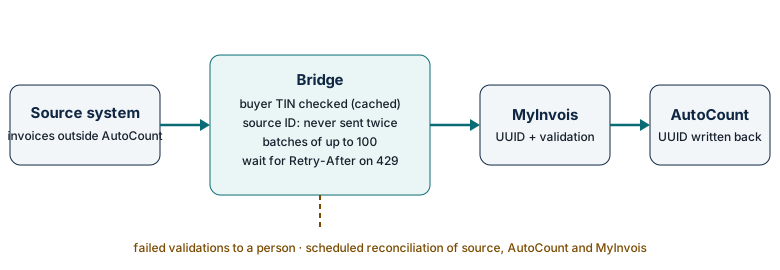
A MyInvois bridge is designed to submit each source invoice exactly once and to account for every one. It uses buyer TINs validated once at buyer set-up, checks the source document ID so nothing is sent twice, retries rate-limited calls after the Retry-After time, stores the UUID returned on acceptance against the AutoCount document and produces a scheduled reconciliation report.
This is the design standard we scope. LHDN allows both transmission routes only “as long as there is no duplication of e-Invoices” (LHDN e-Invoice FAQ (updated 4 Sep 2026)), so de-duplication is a requirement, not a nicety.
Before submission
- Capture with a source ID. Each invoice keeps the ID it had in the source system.
- Use validated buyer TINs. Each buyer’s TIN is validated once, when the buyer is set up, and cached; LHDN advises against calling its Validate TIN API before every submission (MyInvois SDK - Validate Taxpayer's TIN API).
- De-duplicate. Before sending, the bridge looks up the source ID. If the source ID already has a UUID that is not in a failed state, nothing is sent.
During submission
- Batch within limits. Up to 100 e-invoices and 5 MB per submission, 300 KB per e-invoice.
- Retry politely. On HTTP 429 the bridge waits the Retry-After time and resends the same batch, reusing a cached login token (MyInvois SDK: Integration Practices).
After submission
- Write back the UUID. The UUID returned on acceptance, and the final validation status, are stored on the matching AutoCount document.
- Hold exceptions for a person. Failed validations go to a list with the error text.
- Reconcile on a schedule. A scheduled reconciliation report (daily or monthly, agreed at scoping) compares counts and totals in the source system, AutoCount and MyInvois, and lists every gap.
Does my company still need e-invoicing after the RM3 million exemption?
Since 1 September 2026, businesses with annual turnover or revenue below RM3 million are exempt. A company remains in e-invoicing if its turnover is RM3 million or more, from its LHDN start date, or if a group-company test applies: a non-individual shareholder, holding company, or related company or joint venture with turnover of at least RM3 million.
The effective date is in the HASiL media statement (30 Aug 2026); the group tests are in section 1.6.10 of the LHDN e-Invoice Guideline v4.8 (30 Aug 2026). A sole proprietor adds up all sole-proprietorship businesses under the same name (LHDN e-Invoice FAQ (updated 4 Sep 2026)). From YA2026 onwards, a business that reaches RM3 million starts on 1 January of the second year after that year of assessment (LHDN e-Invoice FAQ (updated 4 Sep 2026)). The full picture is in our Malaysia e-invoice 2026 guide.
Can you fix e-invoices that were submitted wrongly in the past?
Past e-invoice mistakes can be disclosed under LHDN’s e-Invoice Special Voluntary Disclosure Programme (SVDP), which runs from 7 July 2026 to 31 December 2027. LHDN says e-invoices disclosed under it face no compliance review, penalty or prosecution, unless the disclosure is non-compliant or involves fraud, wilful default or negligence.
The programme is set out in section 17 of the LHDN e-Invoice Specific Guideline v4.9 (7 Sep 2026). It covers businesses that missed e-invoices since their mandatory date, submitted e-invoices with errors, submitted none, or are under an e-invoice compliance review. LHDN’s FAQ (Q127) says no application is needed. Disclosures use e-invoice version SVDP 1.2 (no digital signature) or SVDP 1.3 (with signature), and consolidated e-invoices are disclosed per month, not as a lump sum.
A bridge we scope for catch-up work would build the monthly SVDP submissions with the same de-duplication and reconciliation as live ones. LHDN’s FAQ states that failure to issue an e-invoice is an offence under Section 120(1)(d) of the Income Tax Act 1967, with a fine of RM200 to RM20,000, imprisonment of up to 6 months, or both, for each non-compliance (LHDN e-Invoice FAQ (updated 4 Sep 2026)); the SVDP and the interim relaxation limit enforcement, subject to conditions. We do not promise any protection beyond what LHDN states. Your tax adviser decides what to disclose.
Need AutoCount e-invoice setup or training?
For AIP setup and AutoCount training, speak to whoever supplies your AutoCount licence. Our focus is invoices that start outside AutoCount. AutoCloud.my scopes that part: getting invoices from other systems into MyInvois and writing each result back to AutoCount. Scoping starts with a free 15-minute call.
AutoCloud.my is operated by Inpixel Marketing (SSM 202003100521), an authorised AutoCount cloud reseller. Founder Vince Tan takes the scoping calls himself and works alongside your accountant and whoever supplies your AutoCount licence.
How much does MyInvois e-invoice automation cost?
We do not publish prices for MyInvois e-invoice automation yet, because each bridge is scoped to the source systems and volumes involved. Cost rises with the number of systems, e-invoices per month, companies, consolidation and self-billing needs, and hosting. The first step costs nothing: a free 15-minute scoping call, then a written scope if a project makes sense.
| Cost driver | Why it matters |
|---|---|
| Number of source systems | Each system has its own data format, IDs and failure modes. |
| e-Invoices per month | Higher volume needs queuing within the API limits and stricter reconciliation. |
| Companies in the group | Each company is scoped as a separate taxpayer. |
| Consolidated and self-billed handling | Monthly consolidation, barred sales and self-billing add rules to test. |
| Buyer TIN quality | Missing TINs in the customer master mean data clean-up before any code. |
| Past submissions to correct | SVDP catch-up adds historical data to rebuild and reconcile. |
| Hosting and monitoring | Where the bridge runs and who watches the exception list. |
HASiL announced that the Government agreed to allow a full capital allowance claim within one year on ICT equipment and software development or customisation costs incurred to implement e-invoice (HASiL media statement on the e-Invoice SVDP (7 Jul 2026)). Ask your tax adviser whether it applies to you.
Key terms
- MyInvois
- LHDN’s e-invoice system. Businesses send e-invoices to it through the free MyInvois Portal, through the API, or both.
- AutoCount e-Invoice Platform (AIP)
- AutoCount’s own e-invoice product, which submits standard, consolidated and self-billed e-invoices from AutoCount software to MyInvois.
- UUID
- The unique document ID that MyInvois assigns to each accepted e-invoice: 26 Latin alphanumeric characters. A bridge stores it against the matching AutoCount document so each sale can be traced to exactly one e-invoice.
- TIN
- Tax Identification Number. In a consolidated e-invoice the buyer’s TIN is the general public TIN EI00000000010; LHDN publishes other general TINs, such as EI00000000030 for foreign suppliers in self-billed e-invoices.
- Consolidated e-invoice
- One e-invoice that aggregates a month’s transactions with buyers who did not ask for an e-invoice, submitted within seven calendar days after the month end.
- Self-billed e-invoice
- An e-invoice issued by the buyer instead of the supplier, in cases LHDN lists, such as payments to agents, purchases from foreign suppliers and e-commerce transactions.
- Intermediary
- A system that logs in to MyInvois with its own credentials and acts for a taxpayer, using an onbehalfof header with that taxpayer’s TIN and only the permissions the taxpayer granted.
- MyInvois bridge
- Middleware that takes invoices from a system other than AutoCount, submits them to MyInvois and writes each result back to AutoCount.
Start with a free 15-minute scoping call. Tell us where your invoices start, roughly how many e-invoices you issue a month and what errors you see. You get a written scope if a project makes sense. We reply Monday to Friday, 9:00 am to 6:00 pm Malaysia time.
WhatsApp +60 14-831 4005 Email hello@autocloud.myRelated guides
- AutoCount API integration: connecting a POS, marketplace or ordering system to AutoCount.
- Malaysia e-invoice 2026 guide: who must issue e-invoices after the RM3 million exemption.
- MyInvois error guide: what common MyInvois and AutoCount e-invoice errors mean and how to fix them.
- AutoCount integration and e-invoice audit: a written roadmap of what to automate, fix or leave alone.
Sources
- LHDN e-Invoice FAQ (updated 4 Sep 2026), Inland Revenue Board of Malaysia (LHDN). Retrieved 9 October 2026.
- AutoCount e-Invoice Solution page, Auto Count Sdn Bhd. Retrieved 9 October 2026.
- LHDN e-Invoice Guideline v4.8 (30 Aug 2026), Inland Revenue Board of Malaysia (LHDN). Retrieved 9 October 2026.
- MyInvois SDK: Login as Intermediary System, Inland Revenue Board of Malaysia (LHDN). Retrieved 9 October 2026.
- MyInvois SDK: Integration Practices, Inland Revenue Board of Malaysia (LHDN). Retrieved 9 October 2026.
- MyInvois SDK: Submit Documents API, Inland Revenue Board of Malaysia (LHDN). Retrieved 9 October 2026.
- LHDN e-Invoice Specific Guideline v4.9 (7 Sep 2026), Inland Revenue Board of Malaysia (LHDN). Retrieved 9 October 2026.
- MyInvois SDK - Validate Taxpayer's TIN API, Inland Revenue Board of Malaysia (LHDN). Retrieved 9 October 2026.
- HASiL media statement (30 Aug 2026), Inland Revenue Board of Malaysia (LHDN). Retrieved 9 October 2026.
- HASiL media statement on the e-Invoice SVDP (7 Jul 2026), Inland Revenue Board of Malaysia (LHDN). Retrieved 9 October 2026.